Smart Spending
Making the most of your money

How to Stop Impulse Buying Online: A 7-Day Plan to Keep More Money
Online shopping is designed to make spending feel effortless: a saved card, one-click checkout, free delivery thresholds and a countdown timer can turn a passing thought into a purchase in minutes. If you want to learn how to stop impulse buying online, you do not need perfect self-control or a harsh no-spend rule. You need a system that makes buying slightly slower and deciding much clearer.
This seven-day reset focuses on your shopping environment. By adding a few useful obstacles between the urge and the checkout button, you can reduce online impulse buying while still buying things you genuinely need and enjoy.
Why Online Impulse Buying Is So Easy
Online shops remove the natural pauses that exist in physical stores. You do not have to travel, queue, carry cash or even type in your address. Retailers also use urgency cues such as “only two left”, limited-time discounts, personalised recommendations and free-shipping progress bars. These features are not neutral; they are designed to shorten the time between wanting and paying.
Targeted ads can follow you from social media to news sites, repeatedly showing an item after you have viewed it once. Add stress, boredom or a difficult day, and shopping can become a quick way to change how you feel. The item may be useful, but the timing of the purchase is often emotional rather than deliberate.
The goal is not to never shop online. It is to separate a real decision from a temporary prompt.
How to Identify Your Personal Shopping Triggers
Before changing your habits, notice what starts them. For one week, write down each urge to browse or buy. You do not need a detailed diary; a few words are enough. Look for patterns in the time, place, feeling and trigger.
- Time: late at night, lunch breaks, payday or Sunday afternoons.
- Emotion: stress, loneliness, boredom, frustration or the desire for a reward.
- Trigger: a social media ad, influencer link, sale email, push notification or free-delivery offer.
- Situation: scrolling in bed, watching television, commuting or avoiding another task.
This is not about judging yourself. It is useful data. If you know that sale emails trigger purchases after 9 pm, you can change the cue instead of trying to argue with yourself every evening.
The 7-Day Impulse-Buying Reset
Use this checklist as a practical reset. Copy it into your notes app or print it out. Each action adds a little friction without making everyday spending complicated.
- Day 1: Remove saved payment methods and delivery addresses from retail websites and apps.
- Day 2: Turn off retailer push notifications and unsubscribe from promotional emails.
- Day 3: Create a waiting list for non-essential purchases.
- Day 4: Set a 24-hour or 72-hour purchase rule based on cost.
- Day 5: Review your social media and ad triggers; mute, unfollow or hide them.
- Day 6: Schedule a 10-minute unplanned-spending check-in.
- Day 7: Clear active baskets using the decision test below and set your lasting boundaries.
Do not try to overhaul every financial habit at once. Complete one small task per day, then keep the tools that make the biggest difference.
Step 1: Remove Saved Payment and Shipping Details
Saved details turn a decision into a reflex. Removing them introduces a useful pause: you must find your card, enter the number and confirm the delivery address. That extra minute is often enough to ask whether you still want the item.
Delete saved cards from retailer accounts, browser autofill and shopping apps. Consider removing shopping apps from your phone entirely and using a browser only when you have decided to buy. Keep payment details available for essentials, such as your supermarket or transport app, if deleting them would create unnecessary hassle.
Step 2: Turn Off Retail Notifications and Marketing Emails
A discount is not a saving if it persuades you to buy something you would otherwise leave alone. Retail emails and notifications create artificial urgency by presenting a sale as an opportunity you may lose. In reality, similar offers usually return.
Unsubscribe from marketing emails, disable promotional notifications and use the “hide ad” or “not interested” option on social platforms. If you need retailer emails for receipts or returns, create a separate folder or email address so promotions do not appear in your main inbox.
Step 3: Create a Waiting List Instead of an Instant Cart
A basket is designed to lead to checkout. A waiting list is designed to preserve your options. When you want a non-essential item, add its name, price, link, date and reason for wanting it to a note or spreadsheet. Then close the tab.
Your list proves that you have not forgotten the item, which makes it easier to walk away. It also lets you compare similar products later rather than buying the first option shown to you.
A simple entry might read: “Running shoes, €89, 12 May, current pair is worn, need before July holiday.” That is very different from “flash sale ends tonight”. The first is a purchase decision; the second is a retailer’s prompt.
Step 4: Use a 24-Hour or 72-Hour Purchase Rule
The 24-hour purchase rule means waiting at least one full day before buying a non-essential item. For larger purchases, extend the cooling-off period. Choose limits that fit your income and normal spending, then apply them consistently.
| Item cost | Minimum wait | What to do during the wait |
|---|---|---|
| Under €25 | 24 hours | Add it to your waiting list and check what you already own. |
| €25–€100 | 72 hours | Compare prices, read independent reviews and check your monthly spending plan. |
| Over €100 | 7 days | Research alternatives, consider total costs and decide where the money will come from. |
Adapt the figures if needed. The point is to make the rule automatic, not to find the perfect threshold. If an item sells out during the waiting period, let that be information: a purchase that only works under pressure may not be the right purchase.
Step 5: Add a Weekly Unplanned-Spending Check-In
Once a week, spend 10 minutes reviewing purchases that were not planned before the week began. Include small orders, in-app purchases, delivery upgrades and subscriptions. Look for the trigger, not just the total.
A free budget app such as WhizBudget can make this easier by giving you one place to record spending and see how unplanned purchases affect your monthly categories. The aim is awareness, not punishment. If you spent €35 on a late-night order, note what happened and strengthen the relevant boundary for next week.
How to Handle Emotional Spending Without Relying on Willpower
Emotional spending is often an attempt to meet a real need: comfort, distraction, novelty, control or a reward. Buying may provide a brief lift, but the feeling usually fades before the parcel arrives. Instead of telling yourself simply to stop emotional spending, prepare a short replacement menu.
- For stress: take a 10-minute walk, shower, stretch or make a hot drink before opening a shopping site.
- For boredom: choose a saved podcast, library book, game or call with a friend.
- For a reward: plan a small amount of guilt-free fun money each month.
- For the urge to browse: add items to your waiting list, then close the app.
Use a “pause first” rule: when you feel the urge to buy for a mood boost, do one alternative activity for 10 minutes. You can still add the item to your list afterwards. This respects the feeling while preventing it from controlling the payment decision.
What to Do With Items Already in Your Cart
Do not treat a full basket as a commitment. Clear it. If you are worried about losing something, move it to your waiting list with the price and link. Then use this simple test after the cooling-off period:
- Would I buy this at full price if there were no countdown or sale banner?
- Do I know when I will use it in the next 30 days?
- Do I already own something that does the same job?
- Can I pay for it without using credit or reducing money needed for bills, savings or debt repayment?
- Would I still choose it if nobody else saw it?
If the answer is no to any key question, leave it on the list for another week or delete it. If the answer is yes across the board, buy it deliberately and enjoy it without guilt.
How to Set Online Shopping Boundaries That Last
Lasting boundaries are specific and easy to follow. “I will spend less” is vague. “I only buy non-essentials from my laptop on Saturdays after checking my waiting list” is clear. Pair your rules with an environment change so they do not depend on motivation.
- Shop only from one device, not from your bed or during commutes.
- Keep a monthly personal spending amount for treats and non-essentials.
- Use a separate debit card or account for discretionary spending if that helps you see the limit.
- Block retail websites during your usual trigger hours with a focus or website-blocking tool.
- Review subscriptions every three months and cancel those you no longer use.
Track the money you did not spend as well as the money you did. Seeing that three skipped €20 purchases became €60 for a goal, holiday or emergency fund makes the benefit concrete. WhizBudget can help you turn those saved amounts into a visible category or goal rather than letting them disappear into everyday spending.
Frequently Asked Questions
How do I stop impulse buying online immediately?
Start by deleting saved payment details, turning off retailer notifications and applying a 24-hour purchase rule to all non-essential items. These changes create an immediate pause before checkout.
Does the 24-hour purchase rule really work?
It works because it separates a temporary urge from a considered decision. Many items lose their appeal after a day; the ones that remain are more likely to be genuinely useful or valued.
What should I do when a sale ends before my waiting period?
Let it go. Retail promotions are frequent, and an offer that requires instant action is often designed to bypass your judgement. Add the item to your list and look for it again later if you still need it.
How can I avoid impulse purchases on social media?
Mute or unfollow accounts that regularly prompt spending, hide targeted ads and avoid saving card details in social shopping features. Use social media on a browser or set a time limit if scrolling leads to shopping.
Is emotional spending a budgeting problem?
Not entirely. A budget can show the impact, but emotional spending is also a habit triggered by feelings and convenience. Pair spending limits with alternative ways to handle stress, boredom or the need for a reward.
Should I stop buying non-essential items completely?
No. A realistic plan leaves room for planned enjoyment. Set an amount you can spend without affecting essentials, savings or debt repayments, and use waiting rules for purchases outside that plan.
Conclusion: Make Thoughtful Spending the Default
Learning how to avoid impulse purchases is less about saying no to everything and more about making room to choose. Remove the cues, slow the checkout process, keep a waiting list and review unplanned spending each week. Small barriers can protect a surprising amount of money over time.
Start with Day 1 today, then use WhizBudget, the free budget app, to see where your online spending goes and give your money a clearer job. Your future budget should not be decided by a notification, a countdown timer or a difficult afternoon.


Cost Per Use: How to Decide Whether an Expensive Purchase Is Worth It
An expensive purchase can look irresponsible at first glance, while a cheaper option can seem like the obvious saving. But the sticker price is only one part of the decision. A well-made coat worn hundreds of times may cost less per wear than several inexpensive coats that need replacing. Equally, a premium gadget used twice can be a costly mistake, whatever its quality.
Cost per use is a simple way to look beyond the price tag. It helps you estimate the value you are likely to get from an item over its useful life, while keeping the purchase grounded in your actual budget and habits. It is not a licence to spend more; it is a tool for making deliberate, value-based spending decisions.
What Cost Per Use Means and When to Use It
Cost per use is the total amount you pay to own an item divided by the number of times you expect to use it. For clothing, this is often called cost per wear. For a coffee machine, bicycle, laptop, sofa or fitness equipment, the same principle applies.
The basic cost per use formula is:
Cost per use = total cost of ownership ÷ expected number of uses
This approach is most useful for discretionary purchases with a meaningful upfront cost, especially when you are choosing between a cheaper item and a durable premium alternative. It can help with:
- Clothes, shoes, bags and outerwear
- Home office equipment and electronics
- Kitchen appliances and hobby supplies
- Furniture and mattresses
- Bikes, sports gear and home fitness equipment
It is less useful for essentials you genuinely need immediately, such as replacing broken safety equipment, or for purchases where use is impossible to estimate. Even then, thinking about lifetime cost of ownership can prevent a rushed decision.
How to Calculate Cost Per Use Step by Step
A cost per use calculator does not need to be complicated. You can use your notes app, a spreadsheet or a budgeting category in WhizBudget to record the numbers before you buy.
- Start with the purchase price. Include delivery, taxes, import charges and any setup fees.
- Add ownership costs. Estimate necessary accessories, maintenance, insurance, repairs, consumables and storage.
- Subtract realistic resale value. Only include an amount you would be genuinely likely to receive after selling fees and collection or postage costs.
- Estimate the number of uses conservatively. Base this on your current routine, not your best intentions.
- Divide the net ownership cost by expected uses. Compare the result with alternatives and your own spending priorities.
Here is a worked example. You are considering a €280 waterproof walking jacket.
| Cost element | Amount |
|---|---|
| Jacket price | €280 |
| Waterproofing treatment over five years | €30 |
| Expected resale value after five years | -€40 |
| Net cost of ownership | €270 |
| Expected wears: 45 per year for five years | 225 |
| Cost per use | €1.20 |
If you mainly walk in dry weather and realistically expect 10 wears a year, the result changes to €5.40 per use. Neither figure automatically makes the jacket good or bad value. The important question is whether that likely use and cost fit your lifestyle and budget.
Estimate the Real Cost of Ownership
The purchase price can understate what an item will cost you. Before deciding, look at its lifetime cost of ownership. This is especially important for products with recurring costs or space requirements.
- Maintenance: servicing a bicycle, cleaning a wool coat, replacing filters or sharpening tools.
- Accessories: cases, chargers, cables, specialist shoes, software subscriptions or compatible equipment.
- Repairs: consider likely wear and whether repairs are affordable and available locally.
- Consumables: coffee pods, printer ink, cleaning products, batteries or replacement parts.
- Storage: bulky equipment can use valuable space in a small flat, garage or paid storage unit.
- Opportunity cost: money spent now cannot earn interest, reduce expensive debt or fund another goal.
- Resale value: durable, repairable brands may retain some value, but fashion trends and technology often depreciate quickly.
Opportunity cost does not mean you should never buy something enjoyable. It means you should acknowledge the trade-off. If a €600 purchase means delaying an emergency fund contribution or carrying credit card debt, its real cost is higher than €600.
Set a Personal Cost-Per-Use Limit Before You Buy
There is no universal “good” cost per use. A €2 cost per wear may be excellent for a tailored work coat and unnecessary for a novelty outfit. Your limit should reflect your income, goals, current savings and the category.
Set the limit before browsing sales, reviews or social media. This reduces the temptation to reverse-engineer a justification for something you already want. You might decide that everyday clothes should cost no more than €1 to €2 per wear, while equipment that supports a weekly hobby can cost more because it replaces paid activities or provides substantial enjoyment.
Also use a simple affordability check: can you pay in full from money allocated to discretionary spending, without touching rent, bills, debt repayments, emergency savings or near-term goals? A low estimated cost per use does not make a purchase affordable today.
Compare a Premium Purchase With a Cheaper Alternative
Premium is not always better value. Compare items on the same realistic assumptions rather than assuming the expensive option will last forever.
| Option | Net ownership cost | Expected uses | Cost per use |
|---|---|---|---|
| Basic office chair | €160 | 500 workdays | €0.32 |
| Ergonomic chair | €620 purchase + €30 maintenance - €200 resale = €450 | 1,500 workdays | €0.30 |
On these assumptions, the ergonomic chair is slightly cheaper per use and may offer better comfort. However, it only wins if you work from home often enough, have the space, and can afford it without borrowing. If your job may change in six months, the cheaper chair or a quality second-hand option may be the more sensible choice.
Look beyond the calculation as well. Check warranty terms, repairability, return policy, safety, comfort and whether the item genuinely solves a problem you have now.
Examples of Cost Per Use in Everyday Spending
Clothing
A €150 pair of leather boots worn twice a week for three winters can have a low cost per wear, particularly if they can be resoled. But occasionwear purchased for one event often has a high cost per use. Borrowing, renting, buying second-hand or choosing something already in your wardrobe may be better value.
Fitness equipment
A €500 exercise bike used four times a week for two years works out at about €1.20 per session before maintenance. If previous home workouts usually stopped after a month, use that history. Try a gym pass, class pack or second-hand machine first rather than assuming a new purchase will transform your routine.
Electronics
A higher-spec laptop can be worthwhile if it supports paid work, study or frequent creative projects for several years. For a phone upgrade, separate a genuine need—such as a failing battery or unsupported security updates—from the appeal of a new model. Technology resale values can fall quickly, so be cautious when counting on them.
Furniture
Furniture used daily, such as a mattress, dining chairs or sofa, may justify a larger budget if it is durable and comfortable. Measure the room first, check delivery costs, and factor in moving or disposal. A bargain sofa that does not fit your home or needs replacing quickly is not a bargain.
When Cost Per Use Can Mislead You
Cost per use is useful, but it has limits. The biggest risk is treating a hopeful estimate as a fact. If you have not used similar items in the past, assume lower usage—not the version of you who suddenly has unlimited time, energy and enthusiasm.
It can also encourage overbuying. An item used frequently is not automatically worth upgrading if your existing version works well. And a low cost per use should never excuse buying on credit at high interest, ignoring a lack of storage, or purchasing something that creates stress.
Finally, not every benefit is financial. A piece of art, a special meal or a gift may have a high cost per use but still be meaningful. Value-based spending allows room for joy; it simply asks you to make the choice consciously and within your means.
A Pre-Purchase Worksheet for High-Cost Items
Use this short worksheet before buying any non-essential item that would noticeably affect your monthly budget:
- What problem will this solve, and do I have a cheaper or free solution?
- What is the all-in purchase price, including delivery and accessories?
- What maintenance, repairs, subscriptions, storage or disposal costs are likely?
- How many times did I use a similar item in the past year?
- What is my conservative expected number of uses over its life?
- What could I realistically resell it for?
- What is the resulting cost per use?
- Can I pay in full from my discretionary budget after bills, savings and debt commitments?
- What goal, purchase or financial progress am I giving up by buying this now?
- Will I still want it after a 48-hour pause, or a 30-day pause for larger purchases?
Tracking planned purchases alongside your spending in the free WhizBudget budget app can make the trade-offs visible before the money leaves your account.
FAQs About Cost Per Use
Is a lower cost per use always better?
No. It is one comparison tool, not the only decision rule. An item can have a low cost per use and still be unaffordable, unnecessary or unsuitable for your home and needs.
How do I estimate the number of uses accurately?
Start with your past behaviour. Check how often you exercised, travelled, wore similar clothes or used comparable equipment in the previous year. Then round down to allow for changing routines, holidays, illness and loss of interest.
Should I include resale value in a cost per use calculation?
Yes, but be conservative. Use likely local resale prices after selling fees, not the original retail price or optimistic listings that have not sold.
Does cost per use work for subscriptions?
Yes. Divide the total subscription cost over a period by the number of times you used it. This can reveal underused streaming services, apps, memberships and delivery benefits.
How does opportunity cost affect an expensive purchase?
Opportunity cost is what the money could otherwise do, such as earn interest in savings, reduce high-interest debt or pay for a priority goal. It matters most when your budget is tight or you would need to borrow.
What is a good cost per use for clothing?
It depends on your income, wardrobe and how often you will wear the item. Set a personal target based on your discretionary budget, and compare it with lower-cost alternatives rather than relying on a universal number.
Make Bigger Purchases Earn Their Place in Your Budget
Cost per use shifts the question from “Is this expensive?” to “Will this deliver enough value for the money, space and attention it requires?” Calculate the full cost, be conservative about use, compare alternatives and protect your core financial priorities.
The best purchase is not necessarily the cheapest or the most premium. It is the one that fits your real life and your financial plan. Use WhizBudget, the free budget app, to plan for larger purchases, track discretionary spending and make every euro work harder for the things you truly value.
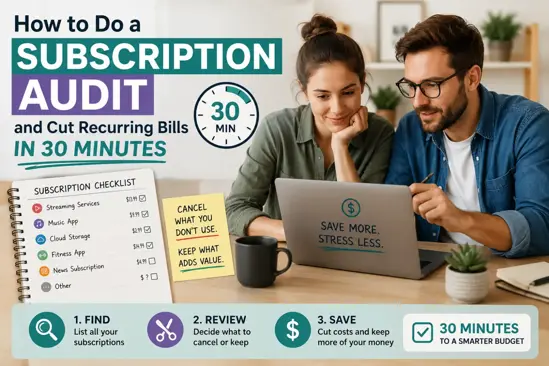
How to Do a Subscription Audit and Cut Recurring Bills in 30 Minutes
If your monthly bills feel higher than they used to, the problem may not be one big expense. It may be ten small recurring payments quietly leaving your account every month. Streaming services, cloud storage, fitness apps, delivery memberships, news subscriptions, software tools, game passes and free trials can add up quickly.
A subscription audit is a fast review of every recurring payment you make. The aim is simple: find what you still use, cancel what you do not, downgrade what is too expensive, and stop future renewals from surprising you. You do not need a complicated spreadsheet or a full afternoon. With the right process, you can do a useful subscription audit in about 30 minutes.
This guide gives you a practical recurring payments checklist, cancellation tips, a keep-or-cut framework, and a simple subscription budget tracker you can use to reduce monthly bills without cutting things you genuinely value.
Why Recurring Subscriptions Quietly Drain Your Budget
Subscriptions are easy to start and easy to forget. Many cost less than a takeaway, so they feel harmless. But the real issue is that they repeat automatically. A €9.99 payment may not worry you in January, but if it continues all year, that single subscription costs almost €120.
Recurring payments also avoid the usual spending decision. When you buy something in a shop, you actively choose to pay. With subscriptions, the choice was often made months ago. After that, your bank account or credit card is charged without you thinking about it.
Common reasons subscriptions become budget leaks include:
- Free trials converting into paid plans after seven, 14 or 30 days.
- Introductory discounts ending and the price increasing quietly.
- Annual renewals landing at the worst possible time.
- Duplicate services, such as paying for several streaming platforms but watching only one.
- App store subscriptions that do not appear under the company name you recognise.
- Family members signing up using shared cards or household accounts.
The goal is not to cancel everything and make life miserable. The goal is to save money on subscriptions you no longer use, no longer need, or could access in a cheaper way.
Step 1: Pull Every Subscription From Bank and Credit Card Statements
Start with the accounts where money actually leaves. Open your online banking and credit card apps. Look at the last three months of transactions. If you have many annual subscriptions, extend your search to 12 months where possible.
Use the search function and look for words such as:
- subscription
- membership
- premium
- monthly
- annual
- renewal
- Apple
- PayPal
- Spotify, Netflix, Amazon, Adobe, Microsoft, iCloud or other known providers
Write down every recurring payment you find. Do not decide yet whether it should stay or go. The first job is to build the full list.
For each subscription, record:
- Provider name
- Amount charged
- Billing frequency, such as monthly, quarterly or annual
- Payment method
- Last charge date
- Who uses it in your household
If your bank categorises card payments automatically, check the categories for entertainment, software, communications, insurance, apps and memberships. Some charges look vague. For example, a payment may appear as a billing processor rather than the actual subscription brand. If you do not recognise a transaction, search the exact merchant name online or check your email for receipts.
Step 2: Check App Stores, PayPal, and Digital Wallets for Hidden Charges
Many unused subscriptions are hidden away from your normal bank statement. You may see a broad charge from Apple, Google or PayPal but not realise it includes several smaller subscriptions.
Check these places carefully:
- Apple App Store: Go to your Apple ID, then subscriptions, to view active and expired app subscriptions.
- Google Play: Open payments and subscriptions in your Google account to see recurring app charges.
- PayPal: Review automatic payments, billing agreements and pre-approved payments.
- Amazon account: Check Prime, channels, Kindle, Audible and subscribe-and-save orders.
- Digital wallets: Review recurring card payments linked to Apple Pay, Google Pay or other wallet services.
- Mobile phone bill: Some app purchases, premium services or add-ons may be charged through your mobile provider.
- Email inbox: Search for terms such as receipt, invoice, renewal, trial ending, subscription and payment successful.
This step is important if you want to know how to cancel unused subscriptions properly. Cancelling an app on your phone does not always cancel the paid plan. Deleting an app usually removes the app only, not the recurring charge. You must cancel through the platform or provider that manages billing.
Step 3: Sort Subscriptions Into Keep, Cancel, Downgrade, and Pause
Once you have your list, sort every subscription into one of four decisions: keep, cancel, downgrade or pause. This keeps the audit practical and stops you from overthinking every small payment.
| Decision | Use this when | Example |
|---|---|---|
| Keep | You use it often, it gives clear value, and the price is fair. | A music subscription used daily by the household. |
| Cancel | You rarely use it, forgot about it, or signed up for a one-off need. | A language app you have not opened in three months. |
| Downgrade | You still use it, but you do not need the premium tier. | Cloud storage with more space than you need. |
| Pause | You use it seasonally or only for a specific period. | A sports streaming pass outside the season. |
Use a simple rule: if you have not used a subscription in the last 30 days, it must justify its place. If you have not used it in the last 90 days, it should usually be cancelled unless there is a clear reason to keep it.
Ask these questions:
- Did I use this in the last month?
- Would I sign up again today at the current price?
- Is there a free or cheaper alternative?
- Am I paying for the same benefit somewhere else?
- Does anyone in my household actually use it?
- Would cancelling this affect work, health, education or essential communication?
This framework helps you avoid random cuts. Some subscriptions are worth keeping because they replace more expensive spending. For example, a well-used streaming service may be cheaper than regular cinema trips. But a forgotten €7.99 app is simply waste.
Step 4: Calculate the True Annual Cost Before Deciding
Monthly prices make subscriptions feel smaller than they are. To make a better decision, convert every recurring payment into an annual cost.
Use these calculations:
- Monthly cost x 12 = annual cost
- Weekly cost x 52 = annual cost
- Quarterly cost x 4 = annual cost
Then add all annual costs together. This number often changes how you see your subscriptions. A household with five modest subscriptions can easily spend €600 to €1,200 a year.
| Subscription | Monthly Cost | Annual Cost | Decision |
|---|---|---|---|
| Streaming service A | €12.99 | €155.88 | Keep |
| Streaming service B | €9.99 | €119.88 | Pause |
| Cloud storage | €9.99 | €119.88 | Downgrade |
| Fitness app | €14.99 | €179.88 | Cancel |
| News subscription | €6.99 | €83.88 | Keep |
| Total | €54.95 | €659.40 | Review |
If you cancel only the fitness app and pause one streaming service for six months, you could save about €240 in a year. That is a meaningful amount for an emergency fund, debt repayment, a holiday budget or rising energy costs.
Step 5: Cancel Unused Subscriptions Without Getting Trapped by Retention Offers
Knowing how to cancel unused subscriptions is just as important as finding them. Many companies make cancellation slower than sign-up. You may be shown discounts, warnings, surveys or limited-time offers before you can leave.
Use this cancellation process:
- Log in to the account where the subscription is managed.
- Go to billing, account, membership or subscription settings.
- Choose cancel, end membership or turn off auto-renewal.
- Continue through every confirmation screen until you receive a final cancellation message.
- Save or screenshot the confirmation.
- Check your email for a cancellation receipt.
- Set a reminder to confirm no further payment is taken.
Be careful with retention offers. A provider may offer three months at 50% off or a free extension. This is useful only if you were genuinely planning to keep using the service. If the subscription is unused, a discount does not make it good value. Paying €4.99 for something you do not use is still wasted money.
If you are cancelling because the price increased, say no to extra features unless they solve a real need. If you are cancelling because you forgot the subscription existed, do not accept another trial period. Cancel cleanly and move on.
For European consumers, it is also worth checking your rights if a provider makes cancellation difficult. Many countries have rules around clear pricing, renewal information and unfair contract terms. If you believe a charge was taken incorrectly after cancellation, contact the provider first, then your bank or card issuer if needed.
Step 6: Downgrade or Share Plans Where It Makes Financial Sense
Not every subscription should be cancelled. Sometimes the better choice is to downgrade. Premium tiers often include features most people do not use: extra screens, more storage, advanced editing tools, faster delivery, exclusive content or business functions.
Look for downgrade opportunities in:
- Streaming: Move from premium to standard if you do not need multiple screens or ultra-high definition.
- Cloud storage: Delete old files and choose a smaller plan.
- Software: Switch from professional plans to personal plans if advanced tools are unused.
- Mobile plans: Reduce data if you regularly use Wi-Fi and never reach your allowance.
- Delivery memberships: Cancel or downgrade if order frequency has dropped.
- Gym and fitness apps: Move to a cheaper off-peak, basic or app-only option if suitable.
Sharing can also reduce costs, but only when it follows the provider’s terms. Family plans for music, cloud storage or productivity software can be good value if several people in the same household use them. Avoid informal sharing that breaks account rules or creates privacy problems.
Before downgrading, check whether you will lose important data, saved files or access to features you rely on. For example, reducing cloud storage below your current usage may stop backups. Download or organise files first.
Step 7: Set Renewal Reminders for Annual and Free-Trial Subscriptions
Annual subscriptions are easy to miss because they do not appear every month. Free trials are risky because you often sign up when you are busy and forget the renewal date. A good subscription audit should not only reduce monthly bills today; it should also prevent surprise charges later.
Set reminders for:
- Annual renewals
- Free trial end dates
- Introductory price expiry dates
- Contract end dates
- Price increase dates
- Seasonal subscriptions you plan to pause
Set the reminder at least seven days before the renewal. For expensive annual plans, set it 30 days before. This gives you time to compare alternatives, cancel during the correct window, or move your data before access ends.
A useful rule is to cancel free trials immediately after signing up if you are allowed to keep access until the trial ends. If the service removes access as soon as you cancel, set two reminders: one a few days before the end and one on the final day.
Step 8: Build a Simple Subscription Tracker to Prevent Future Waste
A subscription budget tracker does not need to be complicated. A small table is enough. The purpose is to make every recurring payment visible in one place.
Your tracker should include these columns:
- Subscription name
- Category
- Cost
- Billing frequency
- Annual cost
- Payment method
- Renewal date
- Decision
- Cancellation link or notes
| Name | Cost | Frequency | Annual Cost | Renewal | Decision |
|---|---|---|---|---|---|
| Music plan | €10.99 | Monthly | €131.88 | 15th monthly | Keep |
| Meal planning app | €29.99 | Annual | €29.99 | 10 September | Review |
| TV add-on | €7.99 | Monthly | €95.88 | 2nd monthly | Cancel |
You can build this in a spreadsheet, notes app or budgeting app. WhizBudget can help by making recurring payments easier to spot within your wider spending picture, so you can see whether subscriptions are taking too much of your monthly income.
Update your tracker whenever you sign up for something new. Add the renewal date immediately, not later. If you keep the tracker current, your next subscription audit should take less than 10 minutes.
Simple 30-Minute Subscription Audit Checklist
Use this checklist if you want a fast, focused audit. Set a timer for 30 minutes and work through the steps in order.
- Minutes 0–5: Open bank and credit card accounts. Scan the last three months for recurring payments.
- Minutes 5–10: Check Apple, Google Play, PayPal, Amazon and digital wallets for hidden subscriptions.
- Minutes 10–15: Write every subscription into one list with cost, frequency and payment method.
- Minutes 15–20: Convert monthly and quarterly payments into annual costs.
- Minutes 20–25: Mark each subscription as keep, cancel, downgrade or pause.
- Minutes 25–30: Cancel the easiest unused subscriptions and set reminders for the rest.
If you run out of time, prioritise cancellations first. You can improve your tracker later, but every cancelled unused subscription stops future waste.
Common Subscription Audit Mistakes to Avoid
A subscription audit is simple, but a few mistakes can reduce your savings or create hassle. Avoid these common problems.
- Only checking one bank account: If you use multiple cards, PayPal or app stores, you may miss hidden charges.
- Deleting apps instead of cancelling plans: This usually does not stop billing.
- Accepting discounts on unused services: A cheaper waste is still waste.
- Ignoring annual renewals: One annual charge can be larger than several monthly payments.
- Forgetting household users: Ask your partner, children or flatmates before cancelling shared services.
- Not saving cancellation proof: Keep confirmations in case you are charged again.
- Replacing cancelled subscriptions too quickly: Wait a few weeks before signing up for an alternative.
Another mistake is cutting subscriptions that reduce larger costs. For example, a budgeting app, tax software or work-related tool may help you avoid bigger financial problems. The point is not to reduce the number of subscriptions to zero. The point is to keep only the ones that earn their place in your budget.
Example: How a €15 Monthly Subscription Becomes a €180 Annual Leak
A €15 monthly charge does not feel dramatic. It may be less than lunch for two or one small online order. But over a year, it becomes €180. If you have five similar subscriptions, that becomes €900 a year.
Here is how small recurring payments build up:
| Monthly Subscription Cost | Annual Cost | Five Similar Subscriptions |
|---|---|---|
| €5 | €60 | €300 |
| €10 | €120 | €600 |
| €15 | €180 | €900 |
| €20 | €240 | €1,200 |
Imagine you signed up for a €15 fitness app in January during a health reset. You used it for three weeks, then stopped. If you never cancel, you pay €180 for something that gave you less than one month of value. That money could cover part of an insurance bill, a train pass, school costs, or a stronger savings buffer.
This is why annualising costs is powerful. It turns a forgettable monthly charge into a real budget decision.
Where Hidden Subscriptions Often Appear
If you still feel that something is missing after your first audit, check the less obvious places. Hidden subscriptions often appear under categories that do not look like entertainment or apps.
- Browser extensions: Writing tools, VPNs, coupon tools and security add-ons.
- Cloud services: Photo storage, backup tools and file sharing plans.
- Learning platforms: Language courses, online classes and professional training.
- Gaming: Game passes, in-game memberships and console network plans.
- News and magazines: Digital newspapers, newsletters and specialist publications.
- Health and fitness: Workout apps, meditation apps, calorie trackers and gym add-ons.
- Shopping memberships: Delivery passes, premium shipping and grocery subscription boxes.
- Finance tools: Credit monitoring, investment research, invoicing tools and budgeting apps.
Also check subscriptions billed in foreign currencies. A small dollar or pound payment can change slightly each month due to exchange rates and card fees. If you live in the eurozone or elsewhere in Europe and pay for services outside your currency area, include the real converted amount in your tracker.
How Often Should You Do a Subscription Audit?
A full subscription audit every three months is enough for most households. This gives you regular control without turning budgeting into a chore. You should also do a quick audit after major life changes, such as moving home, changing jobs, having a baby, starting university, or combining finances with a partner.
Use this schedule:
- Monthly: Check new recurring payments and unexpected charges.
- Quarterly: Review all subscriptions and cancel unused services.
- Annually: Review annual plans, insurance add-ons, software renewals and household memberships.
If your income is irregular or your bills are rising, do the audit monthly until your budget feels stable. A tool like WhizBudget can make this easier by helping you compare subscription spending against other categories, such as groceries, transport and utilities.
FAQs
What is a subscription audit?
A subscription audit is a review of all your recurring payments. You list every monthly, annual or trial-based subscription, check whether you still use it, calculate the annual cost, and decide whether to keep, cancel, downgrade or pause it.
How long does a subscription audit take?
A basic subscription audit can take about 30 minutes if you focus on bank statements, credit cards, app stores, PayPal and digital wallets. A deeper audit that includes 12 months of annual renewals may take longer, but it can uncover bigger savings.
How do I find subscriptions I forgot about?
Check your bank and credit card statements, Apple App Store, Google Play, PayPal automatic payments, Amazon memberships, digital wallets, mobile phone bills and email receipts. Search your inbox for words such as renewal, invoice, subscription, trial and payment.
Should I cancel all subscriptions to save money?
No. Cancel unused or poor-value subscriptions, but keep the ones you use regularly and can afford. Some subscriptions may replace more expensive spending or support work, education, health or family life. The goal is to reduce recurring payment waste, not remove every useful service.
Is it better to cancel or downgrade a subscription?
Cancel if you rarely use the service or would not sign up again today. Downgrade if you still use it but do not need the premium tier. For example, you might keep a cloud storage plan but move to a smaller package after deleting old files.
How can I avoid being charged after a free trial?
Set a reminder as soon as you start the trial. If possible, cancel immediately while keeping access until the trial ends. If that is not allowed, set reminders a few days before the renewal and again on the final day.
What should I do if a subscription charges me after cancellation?
First, contact the provider with your cancellation confirmation. If they do not resolve it, contact your bank, card issuer or payment platform. Keep screenshots and emails as proof. For larger or repeated charges, check local consumer protection guidance in your country.
Conclusion
A subscription audit is one of the fastest ways to reduce monthly bills without changing your whole lifestyle. In 30 minutes, you can find hidden charges, cancel unused subscriptions, downgrade overpriced plans and set reminders before annual renewals hit your account.
Start with your bank statements, check app stores and digital wallets, calculate the annual cost, then sort each service into keep, cancel, downgrade or pause. The key is visibility. Once every recurring payment is in one place, the waste becomes much easier to cut.
If your bills are creeping up, do your audit today and add the results to your budget. WhizBudget can help you track recurring payments, understand where your money is going, and build a spending plan that supports your real priorities. Start with one cancelled subscription, then put the savings to work.
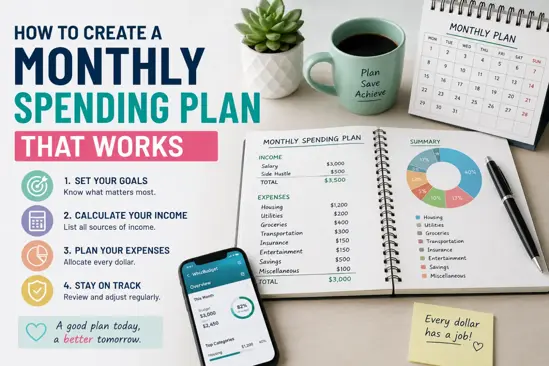
How to Create a Monthly Spending Plan That Works
Creating a monthly spending plan is essential for anyone looking to take control of their finances. A well-structured plan not only helps you manage your expenses but also allows you to save for future goals. In this article, we will explore the importance of a monthly spending plan, provide a step-by-step guide to creating one, suggest tools to track your spending, and highlight common mistakes to avoid.
Understanding the Importance of a Monthly Spending Plan
A monthly spending plan serves as a roadmap for your finances. It outlines where your money is going, helping you identify areas where you can cut back and save. Here are a few benefits of having a monthly spending plan:
- Improved Financial Awareness: You’ll gain insights into your spending habits.
- Goal Setting: It allows you to allocate funds towards specific goals, such as saving for a vacation or paying off debt.
- Reduced Stress: Knowing your financial situation can alleviate anxiety related to money management.
Step-by-Step Guide to Creating Your Spending Plan
Creating an effective monthly spending plan involves several steps:
- Gather Financial Information: Collect your income sources, fixed expenses (like rent), and variable expenses (like groceries).
- Identify Your Goals: Determine what you want to achieve financially in the short and long term.
- Set a Budget: Allocate your income towards different categories: necessities, savings, and discretionary spending.
- Track Your Spending: Use a spending tracker to monitor your expenses and ensure you stick to your budget.
- Review and Adjust: At the end of the month, review your spending plan and make adjustments as necessary.
Tools and Apps to Help You Track Your Spending
There are numerous tools and apps available to assist you in tracking your spending:
- WhizBudget: A user-friendly budgeting tool that helps you create and manage your monthly spending plan effectively.
- Mint: An app that categorizes your transactions and gives you an overview of your financial health.
- You Need a Budget (YNAB): Focuses on proactive budgeting, helping you allocate every euro you earn.
Common Mistakes to Avoid When Planning Your Spending
When creating your monthly spending plan, be mindful of these common pitfalls:
- Underestimating Expenses: Always account for irregular expenses like car maintenance or medical bills.
- Not Adjusting Your Plan: Life changes; be prepared to adjust your budget as needed.
- Neglecting Savings: Make sure to prioritize savings in your spending plan.
FAQs
1. What is a monthly spending plan?
A monthly spending plan is a budget that outlines your anticipated income and allocates it towards various expenses and savings goals.
2. How do I track my spending?
You can track your spending using apps, spreadsheets, or pen and paper. Tools like WhizBudget can simplify this process.
3. What should be included in a spending plan?
Your spending plan should include fixed expenses, variable expenses, savings, and discretionary spending.
4. How often should I review my spending plan?
It's advisable to review your spending plan monthly to ensure you are on track with your financial goals.
5. Can a spending plan help with debt reduction?
Yes, a well-structured spending plan can help you allocate more funds towards debt repayment.
6. What if my income changes?
If your income changes, you should revisit and adjust your spending plan accordingly to reflect your new financial situation.
7. Is it necessary to stick to my spending plan strictly?
While it’s important to stick to your plan as closely as possible, it’s also essential to remain flexible and make adjustments as needed.
Conclusion
Creating a monthly spending plan is a vital step in achieving financial stability. By following the steps outlined above and utilizing tools like WhizBudget, you can take control of your finances and work towards your financial goals. Start today and watch your financial situation improve!

Cash vs. Credit: Which Payment Method Helps You Spend Smarter?
Cash can help you spend smarter if you struggle with overspending, as it sets a clear physical limit.
Credit, on the other hand, offers better tracking and rewards—but only if you pay it off in full each month.
The smarter choice depends on your habits and how disciplined you are with money.
Trying to figure out if using cash or a credit card is better for your wallet?
You’re not alone.
Some folks swear by cash. Others live by their card points.
But which one actually helps you spend smarter?
Let’s dig in and keep it simple.
Cash vs. Credit: What's the Big Deal?
Both payment methods help you make purchases.
But how you use them can shape your spending habits—for better or worse.
Smarter spending doesn’t just mean spending less.
It means:
- Making intentional choices
- Staying within budget
- Avoiding unnecessary debt
- Tracking your money clearly
So, which method gets you there faster?
The Case for Cash
Paying with physical money can feel more “real.”
And that physical feeling can make you pause before spending.
Cash benefits:
- Helps with discipline. You can’t spend what you don’t have.
- Simple to manage. Great for visual budgets like the envelope system.
- No interest or late fees. What you spend is what you owe—period.
Where cash struggles:
- Inconvenient for online or big-ticket items.
- No credit-building potential.
- Easier to lose, harder to replace.
- No automatic tracking. You’ll have to log it manually to keep tabs.
Why Credit Can Work
Credit cards offer flexibility, protection, and perks—but only if used wisely.
Credit perks:
- Can build your credit score. Important for loans, renting, and even insurance.
- Easier to track spending. Most cards have apps or statements with built-in categories.
- Fraud protection. Stolen card? You're not on the hook for charges.
- Rewards and cashback. From flights to groceries, you can earn on purchases you’d make anyway.
But here’s the flip side:
- Tempting to overspend. It doesn’t feel like spending real money.
- Interest charges. Carrying a balance means you’re paying more than the sticker price.
- Fees galore. Late fees, annual fees, foreign transaction fees—they sneak up fast.
Cash vs. Credit: Side-by-Side Comparison
| Feature | Cash | Credit |
|---|---|---|
| Budget control | High | Depends on discipline |
| Credit score impact | None | Builds credit (if used well) |
| Tracking purchases | Manual | Automatic with statements |
| Risk of overspending | Lower | Higher |
| Online purchases | Difficult | Easy |
| Interest or fees | None | Possible |
| Fraud protection | Limited | Strong |
When Cash Might Be Smarter
Use cash if you:
- Tend to overspend with cards
- Prefer a visual, physical limit
- Want to stay away from debt completely
- Are budgeting for day-to-day spending like food or gas
When Credit Might Be Smarter
Use credit if you:
- Pay your balance in full every month
- Track spending through apps or tools
- Want to build or improve your credit score
- Can earn rewards without chasing them
Tips to Spend Smarter—Whatever You Use
- Set a spending cap. Whether it’s $300 in cash or a $300 card limit, know your number.
- Check in weekly. Review how much you’ve spent and adjust if needed.
- Separate needs vs. wants. Helpful no matter how you pay.
- Avoid “out of sight, out of mind.” Just because you’re not carrying cash doesn’t mean it’s free money.
Final Thoughts: Which Payment Method Helps You Spend Smarter?
In the end, both cash and credit can help you spend smarter—or derail your plans—depending on how you use them.
It’s not about choosing a side.
It’s about choosing the tool that fits your habits, your goals, and your lifestyle.
No method is perfect.
But being aware of how each one works gives you the power to make better money choices.
Spend with purpose. Track what matters. Choose what works for you.

Subscription Overload: How to Cut Costs Without Missing Out
Ever looked at your bank statement and thought, Why am I paying for this?
Spotify, Netflix, Amazon, gym memberships, meal kits, cloud storage, personal expense tracking, budget apps—the list goes on and on.
Feels like death by a thousand subscriptions, right?
The worst part? Most of these felt like a good deal when you signed up.
But now, they’re draining your wallet every single month.
Good news: You don’t have to give up everything to save money.
Here’s how to slash your subscription costs without feeling like you're missing out.
1. Find Out Where Your Money Is Going
First step—awareness.
Most people don’t even know how many subscriptions they have.
Check your last three months of bank statements. Look for:
Streaming services
Software subscriptions
Fitness and wellness memberships
Cloud storage
Monthly donation programs
Use a budgeting tool like WhizBudget to track them. If you’re shocked by the total, you’re not alone.
2. Cut What You Don’t Use (Be Brutal)
Now, go through the list and ask yourself: Do I actually use this?
If you haven’t opened an app, watched a show, or used a service in 30+ days, cancel it.
Even small subscriptions add up fast. $10 here, $15 there—that’s hundreds per year.
3. Downgrade Instead of Canceling
Maybe you do use a service, but not enough to justify the cost.
Most companies have cheaper plans that still give you what you need.
Spotify & Apple Music – Free tiers exist (yes, with ads, but hey, it’s free).
Netflix & Hulu – Drop to a lower plan. Do you really need 4K streaming?
Cloud storage – If you’re paying for extra space, check if you actually need it.
Small downgrades = big savings.
4. Share & Save
Why pay full price when you can split the bill?
Many subscriptions allow multiple users:
Netflix, Disney+, YouTube Premium – Family plans exist for a reason.
Spotify Duo – Costs less than two separate accounts.
Amazon Prime – You can share benefits with family.
If you have friends or family using the same services, team up and split costs.
5. Negotiate Like a Pro
Yes, you can haggle your way to lower subscription costs.
Call customer support and ask for a discount.
Say you’re thinking of canceling—companies often offer deals to keep you.
Look for annual plans (cheaper than paying monthly).
It takes five minutes, and the worst they can say is no.
6. Set Reminders for Free Trials
Ever signed up for a free trial, then forgot to cancel?
That’s exactly what companies want.
Before you start a trial, set a reminder on your phone to cancel before the charge hits.
Even better—use a virtual card that auto-expires after the trial. No surprise charges.
Final Thoughts
Subscriptions aren’t bad. They’re just sneaky.
The trick is knowing which ones actually add value—and cutting the rest.
Track your subscriptions
Cancel what you don’t use
Downgrade or share where possible
Negotiate for better rates
Use WhizBudget to stay on top of it all.
You’ll free up hundreds per year—without giving up what you actually enjoy.
And that? That’s money well saved.

How to Get the Best Deals: Tips for Smart Shopping
I used to think getting a great deal was all about luck, stumbling upon a sale or using a coupon at just the right time. But over the years, I’ve learned that smart shopping is a skill, and with the right strategies, you can save a lot without sacrificing quality. Here are some of my favorite tips for scoring the best deals every time you shop.
Do Your Research Before Buying
Impulse purchases can cost you more in the long run. Before making any big purchase, take some time to research. Compare prices across different retailers, read product reviews, and look for discounts or promo codes. Price comparison tools and browser extensions like Honey or Rakuten can help you find the best offers automatically.
Time Your Purchases
Certain times of the year are better for shopping than others. Retailers have predictable sales cycles, so if you can wait, you can get a much better deal. For example:
Electronics and appliances tend to go on sale during Black Friday and Cyber Monday.
Clothing and seasonal items are heavily discounted at the end of each season.
Furniture and home goods often see deep discounts around holiday weekends like Memorial Day and Labor Day.
Use Cashback and Rewards Programs
If you’re not earning cashback or rewards on your purchases, you’re leaving money on the table. Many credit cards offer cashback on everyday spending, and apps like Ibotta and Fetch Rewards give you money back just for shopping at your favorite stores. Signing up for a store’s loyalty program can also lead to exclusive discounts and special promotions.
Stack Discounts for Maximum Savings
One of my favorite tricks is stacking multiple discounts. Here’s how:
Use a coupon or promo code at checkout.
Pay with a cashback credit card for extra savings.
Shop through a cashback site or use a store’s loyalty program for additional rewards.
Buy discounted gift cards for stores you frequently shop at.
These small savings add up quickly and can significantly reduce your overall spending.
Don’t Overlook Secondhand and Refurbished Items
Not everything needs to be brand new. Shopping secondhand can save you a ton, especially for things like furniture, electronics, and clothing. Sites like eBay, Facebook Marketplace, and Thrift stores often have high-quality items at a fraction of the retail price. When buying refurbished electronics, look for certified sellers that offer warranties.
Negotiate and Ask for Price Matches
Many people don’t realize that prices aren’t always set in stone. If you find a lower price at a competitor, ask the retailer if they’ll match it. Some stores even have price adjustment policies, meaning if an item goes on sale after you buy it, they’ll refund you the difference. It never hurts to ask!
Avoid Buying Just Because It’s on Sale
One of the biggest mistakes I used to make was buying things simply because they were on sale. A 50% discount isn’t saving money if it’s something you don’t really need. Before purchasing, ask yourself if you’d buy the item at full price. If the answer is no, skip it.
Smart shopping isn’t just about spending less, it’s about making intentional, informed purchases that add value to your life. By researching, timing your buys, stacking discounts, and taking advantage of rewards programs, you can stretch your money further without sacrificing quality. The key is to stay patient, be strategic, and always shop with a plan. Happy saving!

How to Prioritize Needs vs. Wants for Smarter Spending
Managing money wisely starts with understanding the difference between needs and wants. While both have a place in your budget, prioritizing essential expenses ensures financial stability and helps you reach your financial goals. Here’s how to make smarter spending choices without feeling deprived.
A need is something essential for survival and daily living. This includes housing, food, utilities, transportation, healthcare, and basic clothing. Wants, on the other hand, are non-essential items that enhance your lifestyle, such as dining out, streaming subscriptions, designer clothing, and luxury gadgets.
To make better spending decisions, start by evaluating your current expenses. Track your spending for a month and categorize each expense as a need or a want. This will give you a clear picture of where your money is going and help you identify areas where you can cut back.
A simple way to balance needs and wants is to use a budgeting method like the 50/30/20 rule. Allocate 50% of your income to needs, 30% to wants, and 20% to savings or debt repayment. This approach ensures that necessities are covered while still allowing room for enjoyable spending.
When making a purchase, ask yourself whether it aligns with your financial goals. Delaying non-essential purchases, comparing prices, and setting spending limits for discretionary items can prevent impulse buying. Additionally, look for cost-effective alternatives, such as cooking at home instead of dining out or opting for second-hand items instead of brand-new ones.
Prioritizing needs over wants doesn’t mean cutting out all luxuries, it means making intentional choices that align with your financial well-being. By distinguishing between essential and discretionary expenses, tracking spending, and using a balanced budgeting approach, you can enjoy financial freedom while still treating yourself responsibly.

Grocery Budgeting 101: How to Save Money Without Compromising Quality
Groceries are a major expense for most households, but with the right budgeting strategies, you can save money without sacrificing quality. By planning ahead, making smart choices, and using a few simple tricks, you can stretch your food budget while still enjoying healthy and delicious meals.
Planning meals in advance and making a shopping list is one of the easiest ways to cut down on unnecessary spending. It helps you avoid impulse purchases, reduce food waste, and stay within your budget. Plus, knowing what you’re cooking for the week can make meal prep a breeze.
Setting a weekly or monthly grocery budget can help you stay on track. A good rule of thumb is to allocate about 10-15% of your income to food expenses. Keeping an eye on your spending with WhizBudget can make a huge difference.
When you head to the store, having a strategy in place will help you get the most value for your money. Buying in bulk can save you money on staples like rice, pasta, and canned goods. Using coupons, taking advantage of store loyalty programs, and comparing unit prices can also lead to big savings. Shopping for seasonal produce or visiting local farmers' markets can get you fresher food at lower prices.
Reducing food waste is another way to keep grocery costs down. Store food properly to keep it fresh longer, and get creative with leftovers instead of tossing them. Freezing extra portions or batch-cooking meals can also help you make the most of your ingredients and cut down on waste.
Cooking at home is one of the best ways to save money. Eating out frequently adds up quickly, and homemade meals give you more control over ingredients and portion sizes. If you’re short on time, meal prepping in advance can make home cooking much easier and more convenient.
While it’s great to stick to a shopping list, staying flexible can help you take advantage of deals and discounts. If an item is too expensive, consider swapping it out for a more affordable alternative. Sometimes the best savings come from being open to adjustments.
Grocery budgeting doesn’t have to feel restrictive. With a little planning and a few smart habits, you can enjoy delicious, nutritious meals without overspending. Start making small changes today, and you’ll be surprised how much you can save over time.
Looking for more budgeting tips? Explore our blog for practical money-saving strategies!

Can DeepSeek AI Transform Your Budgeting?
Managing a budget can be time-consuming, but what if AI could simplify the process? DeepSeek AI is transforming how people track expenses, optimize spending, and plan for the future. By leveraging artificial intelligence, you can get a clearer picture of your finances, spot spending patterns, and make data-driven decisions to save more money.
How AI is Changing Budgeting
Artificial intelligence is no longer just for big businesses. It’s now accessible for personal finance management. Here’s how AI-powered tools like DeepSeek are making budgeting easier:
Spending Insights – Identify trends and areas where you might be overspending.
Smart Budgeting Recommendations – AI suggests personalized budget adjustments based on your habits.
Forecasting & Predictions – Get insights into future expenses and how much you should save.
DeepSeek AI: A Game Changer for Expense Tracking
DeepSeek AI uses advanced algorithms to analyze your financial data beyond traditional budgeting apps. Here’s what makes it stand out:
Real-Time Financial Overview: See your total account balances, categorized spending, and savings progress.
Personalized Alerts: Get notifications when you’re close to exceeding your budget in a specific category.
Historical Spending Analysis: Review past months to understand spending trends and adjust accordingly.
Smart Goal Setting: AI helps you create realistic savings goals based on your income and expenses.
Why You Should Use AI for Budgeting
If you’ve ever wondered where your money goes each month, AI can give you the answer fast. Here’s why more people are turning to AI for financial management:
Saves Time: No more manually entering transactions.
Eliminates Guesswork: AI provides accurate insights to help you make informed financial decisions.
Improves Financial Health: Spotting spending patterns helps you cut unnecessary expenses and save more.
Conclusion
DeepSeek AI is redefining budgeting by making it smarter, easier, and more efficient. Whether you're trying to save money, control your spending, or plan for the future, AI-driven tools can give you the clarity and control you need. Start leveraging AI for your finances today and take the stress out of budgeting!
Are you ready to let AI take your budgeting to the next level? Explore DeepSeek AI and start optimizing your finances today!
Trending Topics


Recent Posts
How to Create a Monthly Spending Plan That Works
Jul 17, 2026
How to Get the Best Deals: Tips for Smart Shopping
Feb 23, 2025